(日本語版: MCP 101:AIがトレーニングデータの先にある世界とつながる方法)
TL;DR: MCP is an open standard that gives AI applications a common way to connect to external tools, data, and business systems beyond LLM’s built-in knowledge. It enables AI to move from simply answering questions, to taking actions, and ultimately orchestrating workflows across multiple systems. Think of MCP as a common language that AI and the systems (where your data and work actually live) can talk & understand.
It feels like everyone is talking about MCP (Model Context Protocol) these days when it comes to large language models (LLMs). Most articles I came across compare it to a “USB port for AI”—an analogy I never found particularly helpful.
In this post, I’ll try to explain the basic idea behind MCP: what this buzzword actually means and how it fits into the broader AI wave.
Plain-Vanilla LLM: Knows a Lot—but Not Everything
So how does MCP actually work?
How Agents use MCP: Retrieve, Act, and Orchestrate
Plain-Vanilla LLM: Knows a Lot—but Not Everything
Imagine interacting with an Agentic system—an AI conversation experience powered by an LLM (Large Language Model)—and asking: “What is the capital of France?”
Easy. The AI can answer using knowledge it learned during training.

But then you ask: “What happened in the news this morning?”
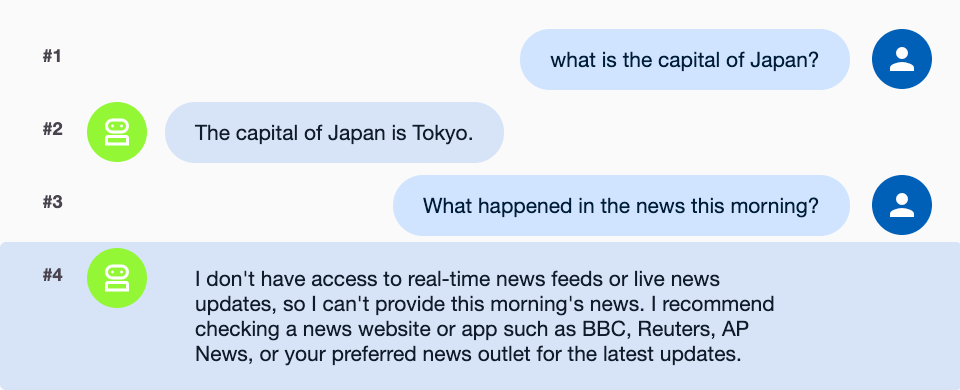
Now we have a problem.
AI by itself doesn’t automatically know what happened this morning. Its built-in knowledge comes from its training and whatever information is provided to it. So let’s give our Agent another capability: Web search, and only then, asking about today’s news, the AI can search the web (for new information that’s outside its training data), and use it to answer us. WOW! We have expanded what the AI can do.
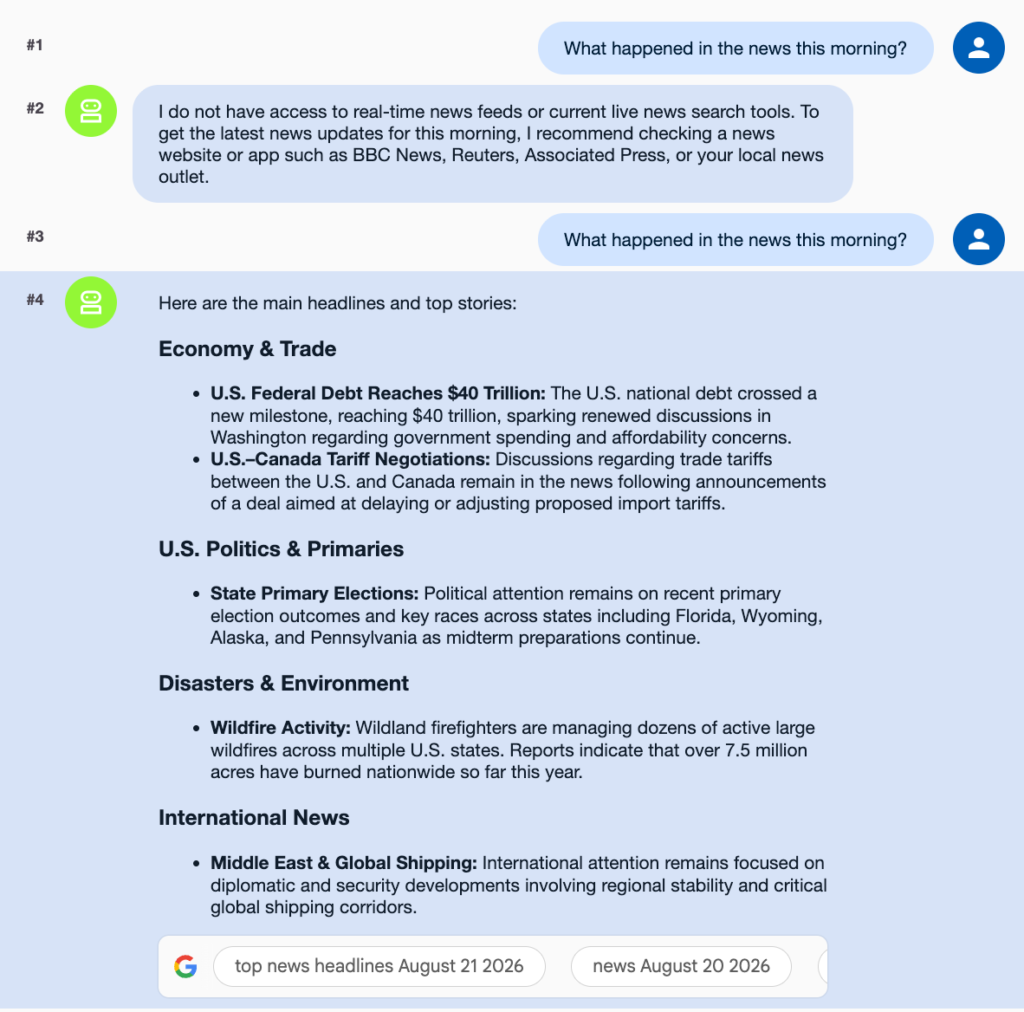
But let’s ask another question:
“How many users visited from Ad campaign XYZ, and what was the conversion rate?”
OR
“Scan the tables in my BigQuery dataset”
OR:
“What was the latest email from our customer?”
The information exists somewhere. But it isn’t on the public web. It might be inside Google Calendar, Outlook, Salesforce, GA4, a company CRM, or another internal system. AI needs some way to integrate and access information in those systems. And if every AI application needs a completely different integration for every system, things quickly become complicated.
This is where MCP comes in.
What is an MCP Server?
Until now, our Agent has relied mainly on the knowledge available to it. We then gave it an additional capability—web search—allowing access to information beyond its training data. What if we could keep on adding capabilities like this?
This is where MCP (Model Context Protocol) comes in. Introduced by Anthropic in November 2024 only, MCP is an open standard for connecting AI applications to external tools and data, giving your AI better, relevant context to user prompt.
An MCP Server (one component of the overall MCP concept) exposes these capabilities to the Agent. Think of it as plugging additional capabilities into your Agent.
For example, web search could be provided through an MCP server:
- Agent → Web Search MCP Server → Search Engine
More importantly, we could connect our internal business systems:
- Agent → Salesforce MCP Server → Your Salesforce data
- Agent → GA4 MCP Server → Your GA4 data
Now, subject to the permissions you provide, the Agent can query these systems and answer questions using your own data.
So we are moving from: Agent + its existing knowledge
To: Agent + Web Search + Salesforce + GA4 + other capabilities
with MCP providing a standard way to connect these external capabilities to the Agent.
It is also worth knowing three common terms that describe how an MCP server exposes its capabilities:
- Tools: Functions the AI can call to retrieve information or perform actions, such as searching a database or creating a calendar event.
- Resources: Data or content that can be provided as context to the AI, such as files, database schemas, or application records.
- Prompts: Reusable templates or workflows that help users perform common tasks, such as reviewing code or summarizing a document. This is a good way to guide users on how to get the most out of your MCP Server capabilities.
A very short history of MCP
MCP is surprisingly young.
November 2024 — Anthropic releases MCP
Anthropic open-sourced MCP on November 25, 2024.
At launch, the emphasis was heavily on local MCP servers. Claude Desktop supported connecting to local MCP servers, and Anthropic released example servers for systems including Google Drive, Slack, GitHub, Git, Postgres and Puppeteer.
The early architecture therefore often looked something like: Claude Desktop → local MCP server → tool/data. The MCP server ran on your computer.
March 2025 — OAuth authorization arrives
A major change appeared in the March 26, 2025 MCP specification. MCP added a comprehensive authorization framework based on OAuth 2.1 for HTTP-based connections.
Why does that matter? Consider the difference between:
“Search this public documentation.”
And:
“Read my email.”
The second request requires the system to know who you are and what you have permission to access. OAuth provides a standardized way to handle that authorization.
This becomes particularly important as MCP moves beyond running locally on your laptop toward remote MCP servers accessed over the internet.
June 2025 — Authentication matures for remote MCP
The June 18, 2025 MCP specification further strengthened the OAuth architecture for remote MCP servers.
A protected MCP server was now explicitly treated as an OAuth Resource Server. The specification also adopted RFC 9728, allowing an MCP client to discover which Authorization Server should authenticate and authorize the user.
In simple terms, this created a clearer separation between:
MCP Server → provides the tools and data
Authorization Server → handles authentication and issues access tokens
Why does this matter for adoption? It makes it easier for remote MCP servers to work with existing enterprise identity and OAuth infrastructure, rather than every MCP provider inventing its own authentication system.
For businesses, this was another important step toward MCP becoming suitable for secure, remote, enterprise integrations.
May, 2025 — OpenAI adopts MCP
Another important milestone was MCP spreading beyond Anthropic’s own ecosystem.
OpenAI added remote MCP support on May 21, 2025 in its Responses API. That meant MCP was no longer simply something used within the Claude ecosystem. Different AI platforms could speak the same protocol to MCP servers.
And that is where the idea of a standard becomes much more powerful.
Instead of:
Build a Claude integration
Build an OpenAI integration
Build another integration for the next AI platform
the long-term idea becomes closer to: Expose a capability through MCP, and allow different MCP-compatible AI applications to use it.
So how does MCP actually work?
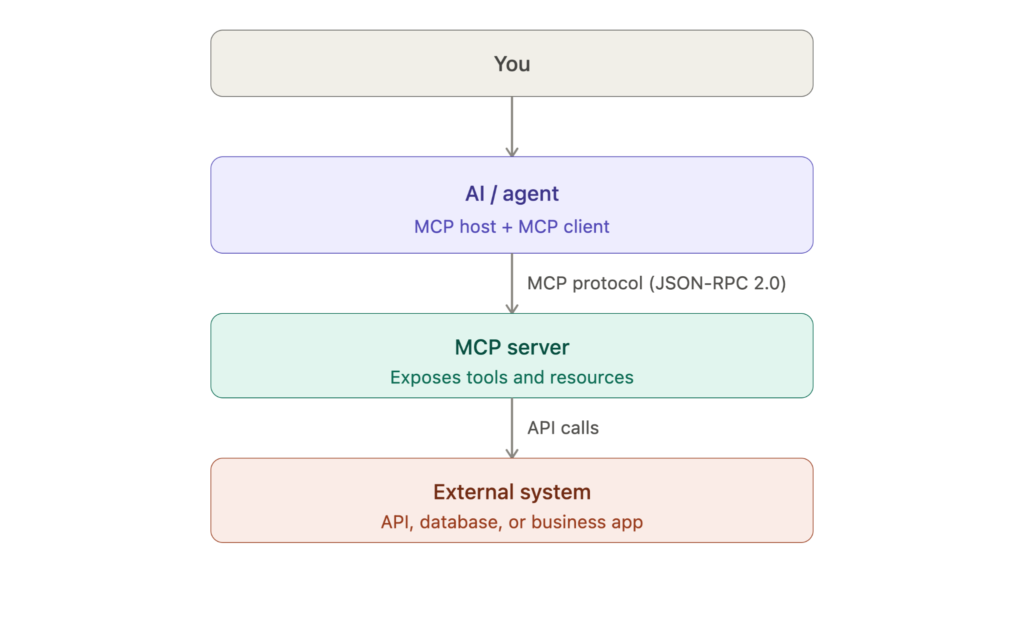
At a high level, MCP has a relatively simple architecture. There are three concepts worth understanding:
- MCP Host: an AI application like Claude Desktop or ChatGPT, or a development IDE like Cursor or VS Code
- MCP Client: a component, often built into the MCP Host, that communicates with an MCP Server
- MCP Server: exposes capabilities that the AI application can use to access external data or take actions. It can, for example, make API calls to databases or applications as required by the user.
Often, the MCP Host and MCP Client are combined within a single system. For a business audience, we can simplify the picture to:
Different flavors of MCP
MCP servers can differ along two separate dimensions:
Where they run: Local vs. remote MCP servers
A local MCP server runs on your computer: AI application → MCP server on laptop → local files or tools
This pattern is useful for developer tools and resources already available on the user’s machine. In practice, setting up a local MCP server often means downloading code to your computer, installing the required software and dependencies, and changing configuration settings in your AI application. This may be manageable for developers, but it creates a significant adoption barrier for non-technical business users.
When MCP was first introduced, local servers made up much of its early wave. Many were built by individual developers as hobby projects. Remote MCP servers emerged later as the ecosystem matured. Local servers remain widely used today, particularly for tasks such as coding, debugging a codebase, and searching files on a computer.
Historically, local MCP servers also could not connect directly to common web chat interfaces such as Claude.ai or ChatGPT.com, further limiting adoption among business users.
A remote MCP server runs elsewhere (for example, in cloud infrastructure) and is accessed over the internet: AI application → internet → company’s MCP server → company API
Remote servers are especially useful for SaaS products and enterprise systems because the provider can operate them centrally. Their biggest advantage is ease of adoption: business users can connect them directly to familiar AI chat interfaces that support remote MCP, such as Claude.ai, Claude Desktop, ChatGPT.com, and ChatGPT Desktop—without downloading code or installing software locally.
Whether they require authentication: Authenticated vs. unauthenticated MCP servers
An unauthenticated MCP server exposes information or capabilities without needing to know who the user is—for example, searching public documentation.
An authenticated MCP server must determine: Who are you? And what are you allowed to access? It therefore requires user authentication before the AI can use protected capabilities (for ex Sign-In with your Google account). For example, when you ask an AI, “How many users visited from Ad campaign XYZ, and what was the conversion rate?” the analytics service (e.g., GA4 or BigQuery) must identify you and verify which analytics data you are allowed to access.
These distinctions are related but not identical.
- A remote server may be authenticated or unauthenticated,
- and a local server may also require credentials to access protected systems.
A word of caution: As more MCP servers emerge promising to simplify everyday tasks, only install and use servers from sources you trust. Be especially careful when a server requests access to sensitive resources—such as your local file system—or authorization to connect to external services such as GA4, a CRM, or a database.
How Agents use MCP: Retrieve, Act, and Orchestrate
MCP is not the Agent. An MCP server exposes capabilities, but the Agent decides when and how to use them.
Imagine an MCP server provides a tool called get_customer_information. When called with a customer ID, the tool retrieves the corresponding information. However, the Agent must still decide:
- Should I call this tool?
- Which customer should I look up?
- Do I need another tool afterward?
- What should I do with the information?
A useful mental model is:The Agent decides what to do. MCP provides a standardized way to interact with the tools that can do it.
Using these capabilities, an Agent can operate at three broad levels:
Retrieve: The Agent retrieves information and answers a question.
“Get the performance of campaign XYZ.”
Question → Retrieve → Answer
Act: The Agent uses a tool to change something in an external system.
“Create a new GA4 tag in GTM-XYZ.”
The Agent selects the appropriate capability and calls it through a GTM MCP server.
Request → Decide → Act
Orchestrate: The Agent may combine capabilities from multiple systems to complete a more complex workflow.
For example: “Investigate why this customer’s account is having problems and prepare a summary for the account manager.”
The Agent might:
- Find the customer in the CRM.
- Retrieve recent support tickets.
- Check relevant system information.
- Search internal documentation.
- Determine the likely issue.
- Prepare a summary.
- Send it to the account manager.
The Agent decides which capabilities to use, their order, the input for each step, and what to do next based on the results.
This gives us a simple progression: Retrieve → Act → Orchestrate
Future Capabilities
This is a fast-evolving space, with new capabilities continuously emerging across the MCP ecosystem to improve the user experience and make AI more capable.
FastMCP Apps is already capable of embedding experiences such as interactive dashboards directly within the chat interface. FastMCP is a high-level Python framework (not an MCP standard itself!) designed to simplify building MCP servers, clients, and interactive applications
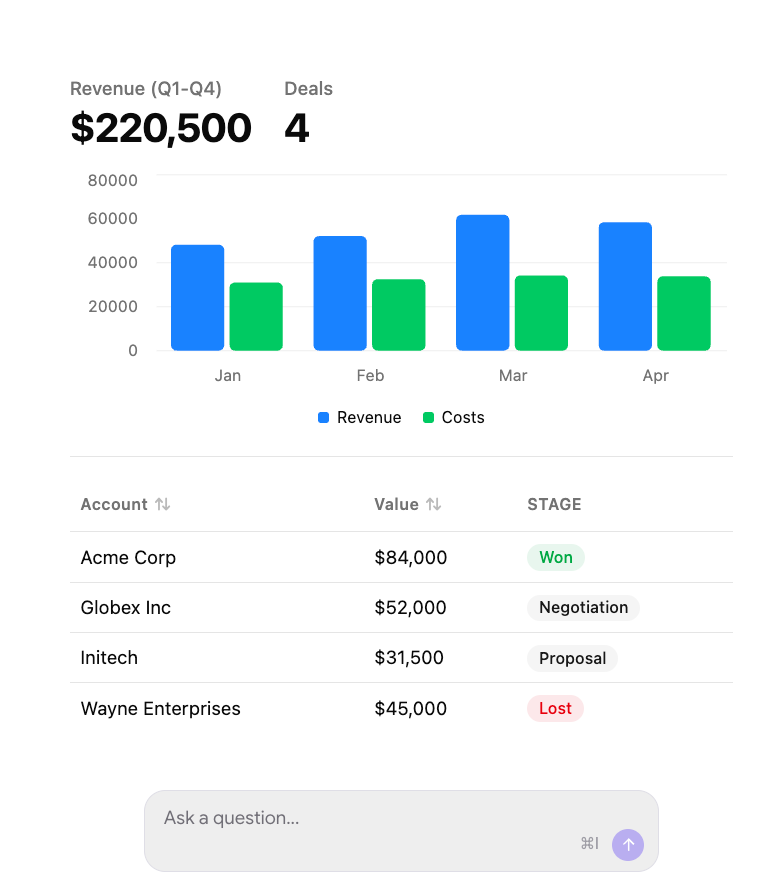
(image ref: FastMCP website – https://gofastmcp.com/apps/prefab)
Conversational AI payments allow customers to complete e-commerce transactions directly within a chat interface, without being redirected to an external website or handed off to a human agent. A merchant’s MCP server can expose tools for browsing its product catalog, creating a checkout, and processing payments securely. By making these capabilities available through natural-language interactions, businesses can reduce checkout friction and help limit cart abandonment.
I hope that after reading this, you have a clearer understanding of what this buzzword—MCP—actually means and how it fits into the broader AI wave. In subsequent posts, we’ll explore how we use MCP servers within Ayudante to improve productivity and enable workflows that were previously difficult—or simply not possible.